The best keyboards for work balance a practical layout with the typing feel and connection options that suit your daily tasks. These picks range from quiet full-size office boards to compact mechanical models, so consider whether you need a number pad, multi-device switching, or room to customize.
Quick Top Products
JLab Epic Wireless Keyboard
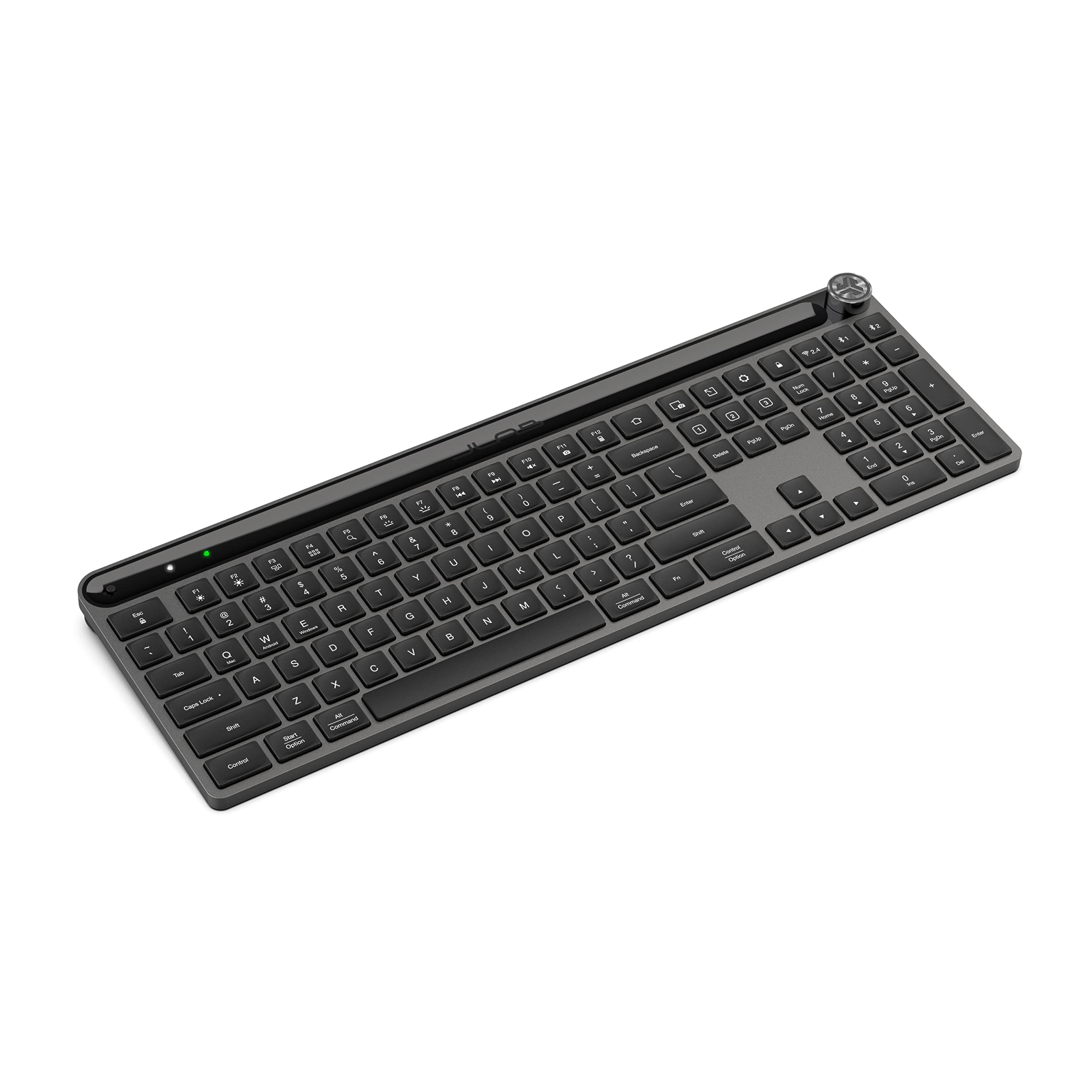
- 108 full-size backlit keys with a metal base
- Bluetooth pairing for up to three devices, plus a USB dongle
- Media knob and up to three custom profiles through the JLab Work App
Best For: People who want a full-size wireless keyboard with backlighting and easy device switching.

JLab JBuds Wireless Keyboard
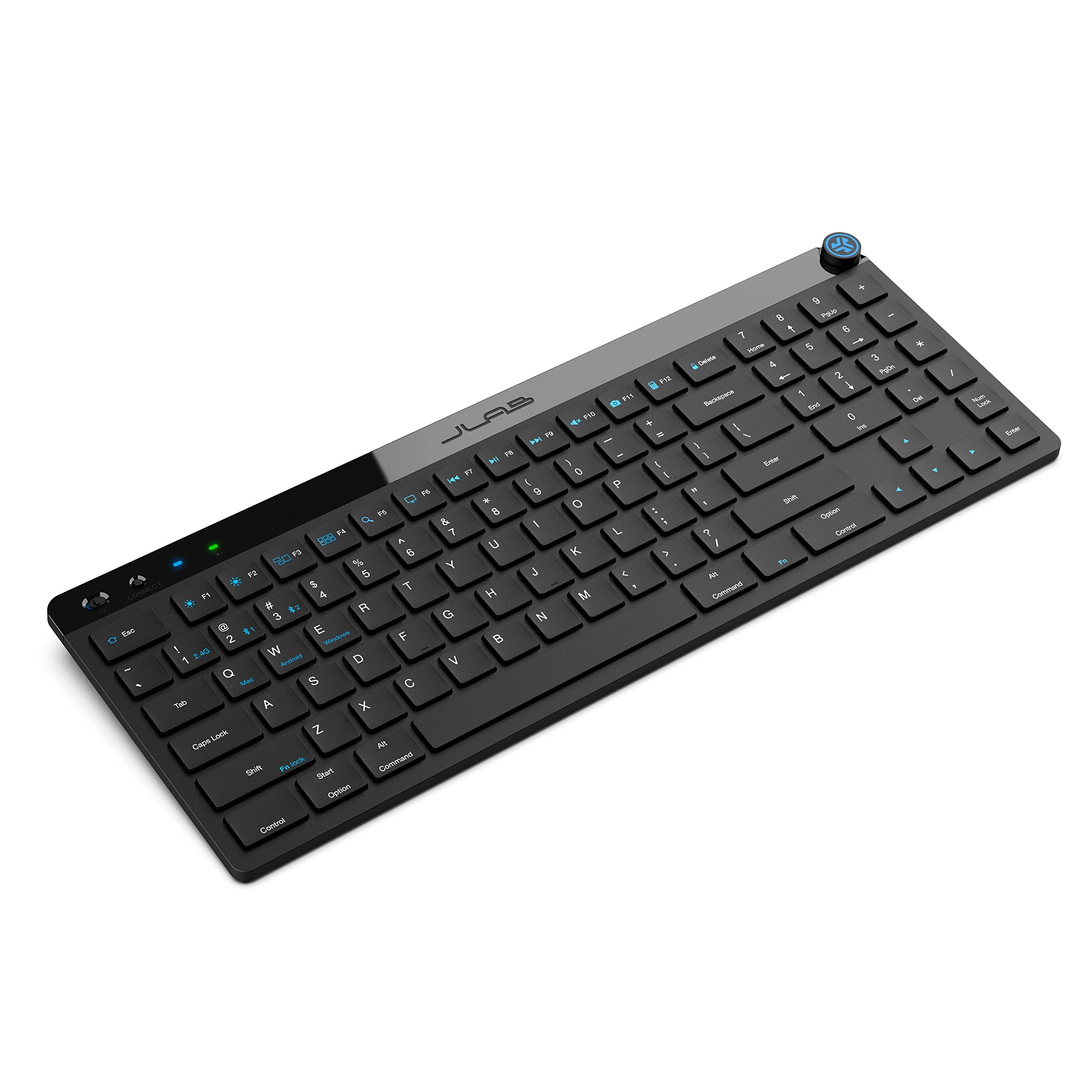
- 95 soft-touch keys with a full numerical pad
- Bluetooth 5.2 and USB dongle connections, with up to three device connections
- Media knob, programmable shortcuts, and up to three app profiles
Best For: Desk users who want a slim, quiet keyboard with a number pad and multi-device support.
SteelSeries Apex 3 TKL
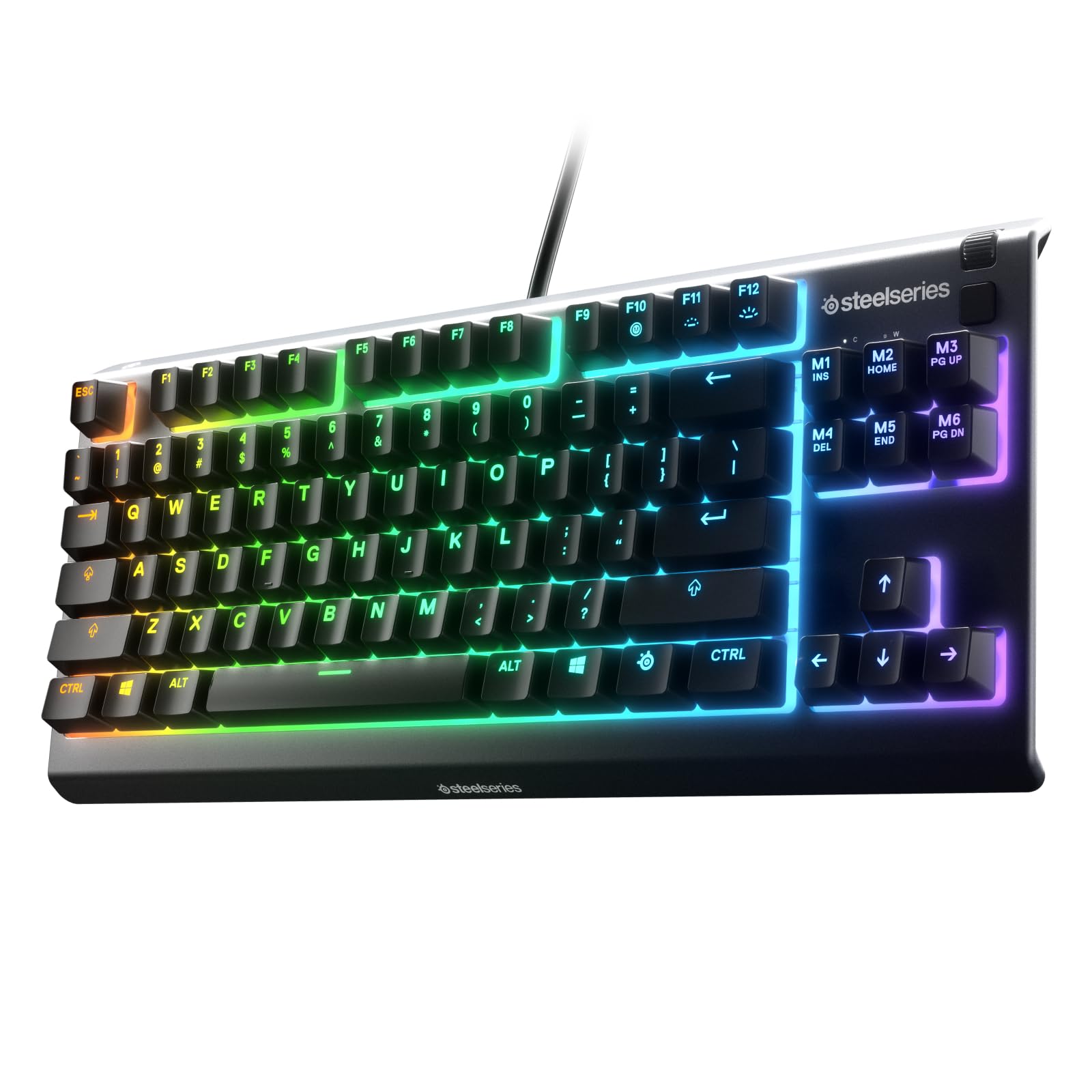
- Tenkeyless layout with whisper-quiet switches
- IP32 water and dust resistance
- Dedicated media controls with a clickable volume roller
Best For: People who want a quieter wired keyboard and more open desk space.
SteelSeries Apex 3
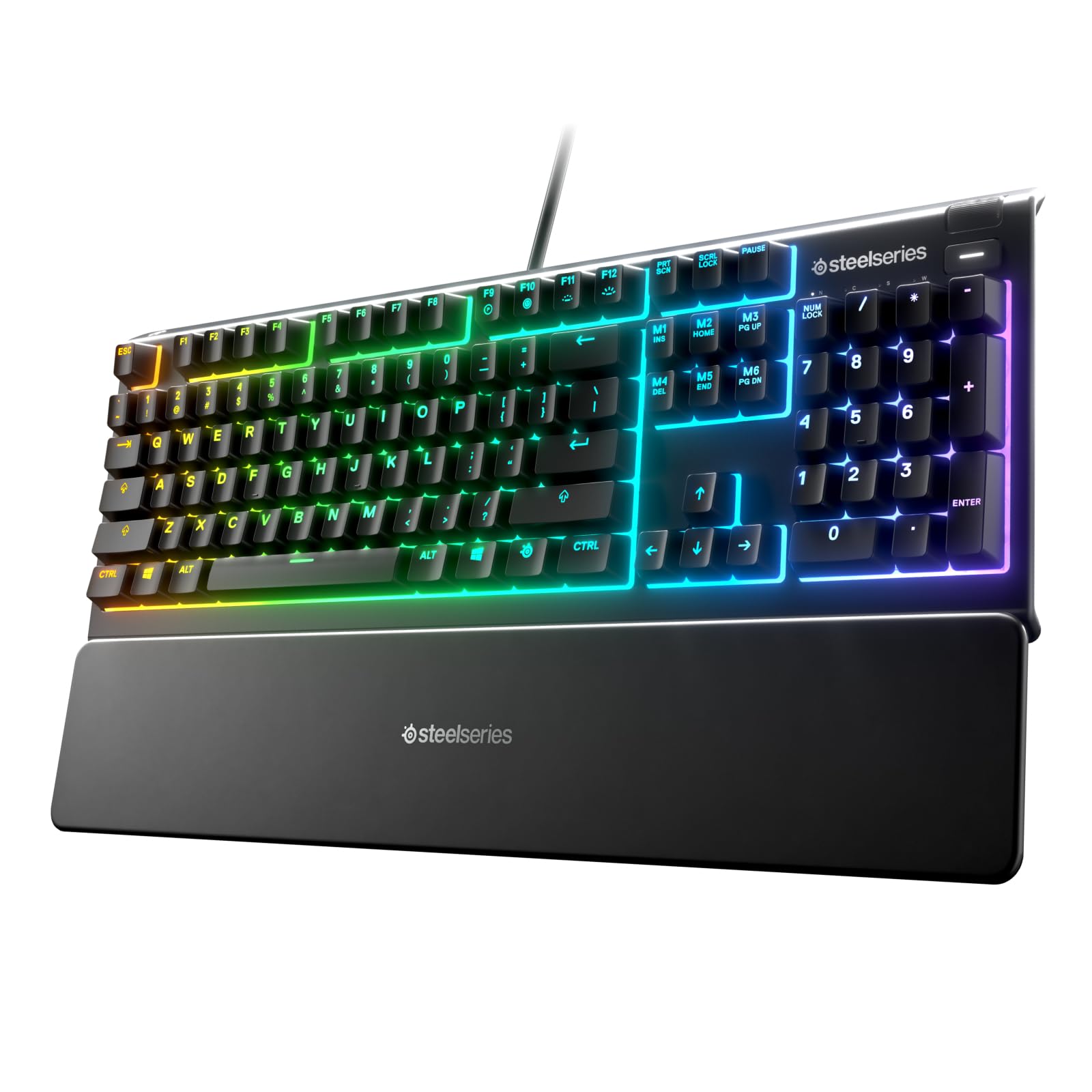
- Full-size keyboard with whisper-quiet switches
- Magnetic wrist rest and dedicated multimedia controls
- IP32 water resistance and 10-zone RGB illumination
Best For: Workers who want a quiet full-size keyboard with a wrist rest and dedicated media controls.
SOLAKAKA KI99 Pro Quiet
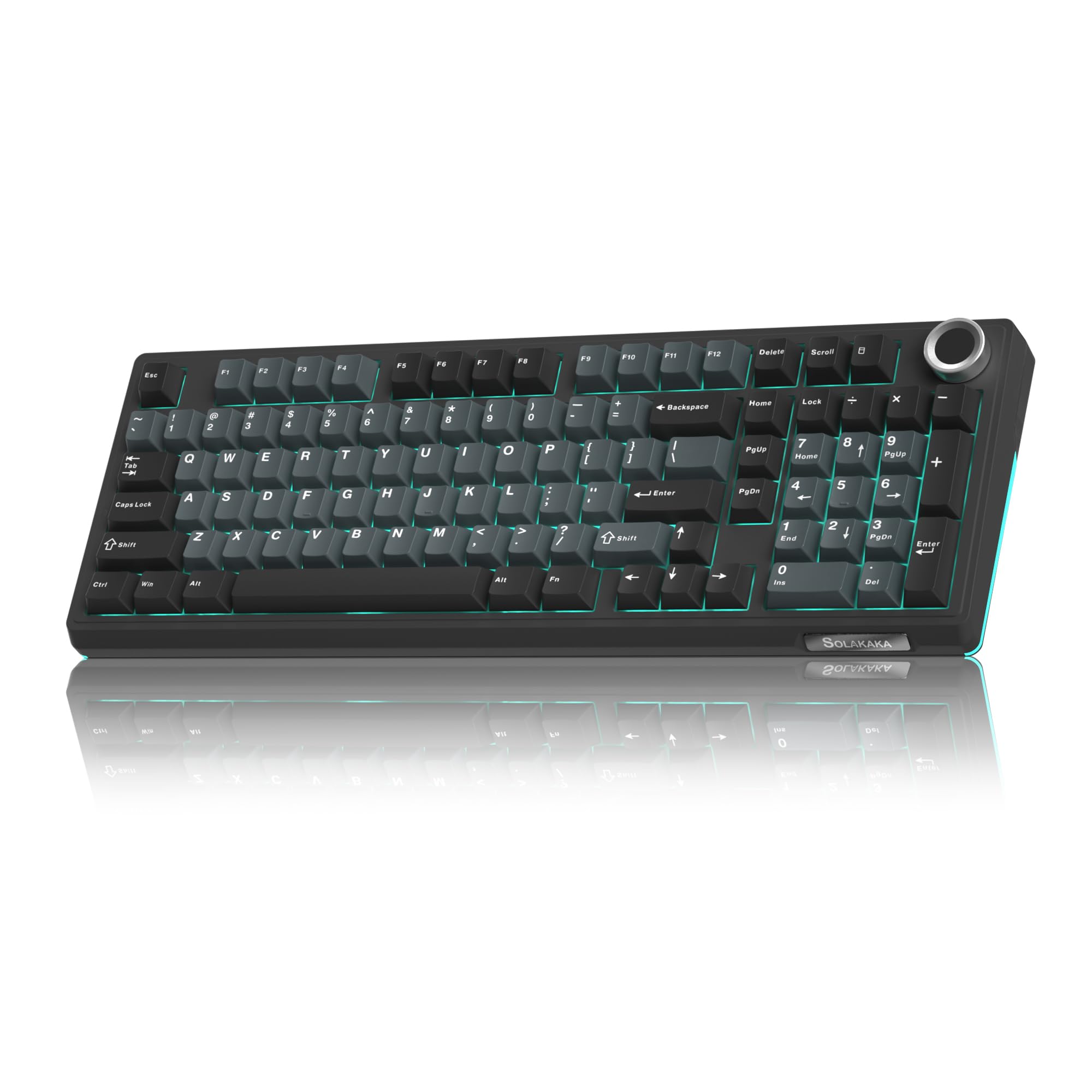
- 96% layout with number pad and multifunction knob
- Bluetooth, 2.4 GHz, and USB-C connection modes
- Quiet switches, five noise-reducing layers, and hot-swappable keys
Best For: Mechanical-keyboard users seeking a quiet-switch wireless board with a number pad.
SOLAKAKA KI99 Pro
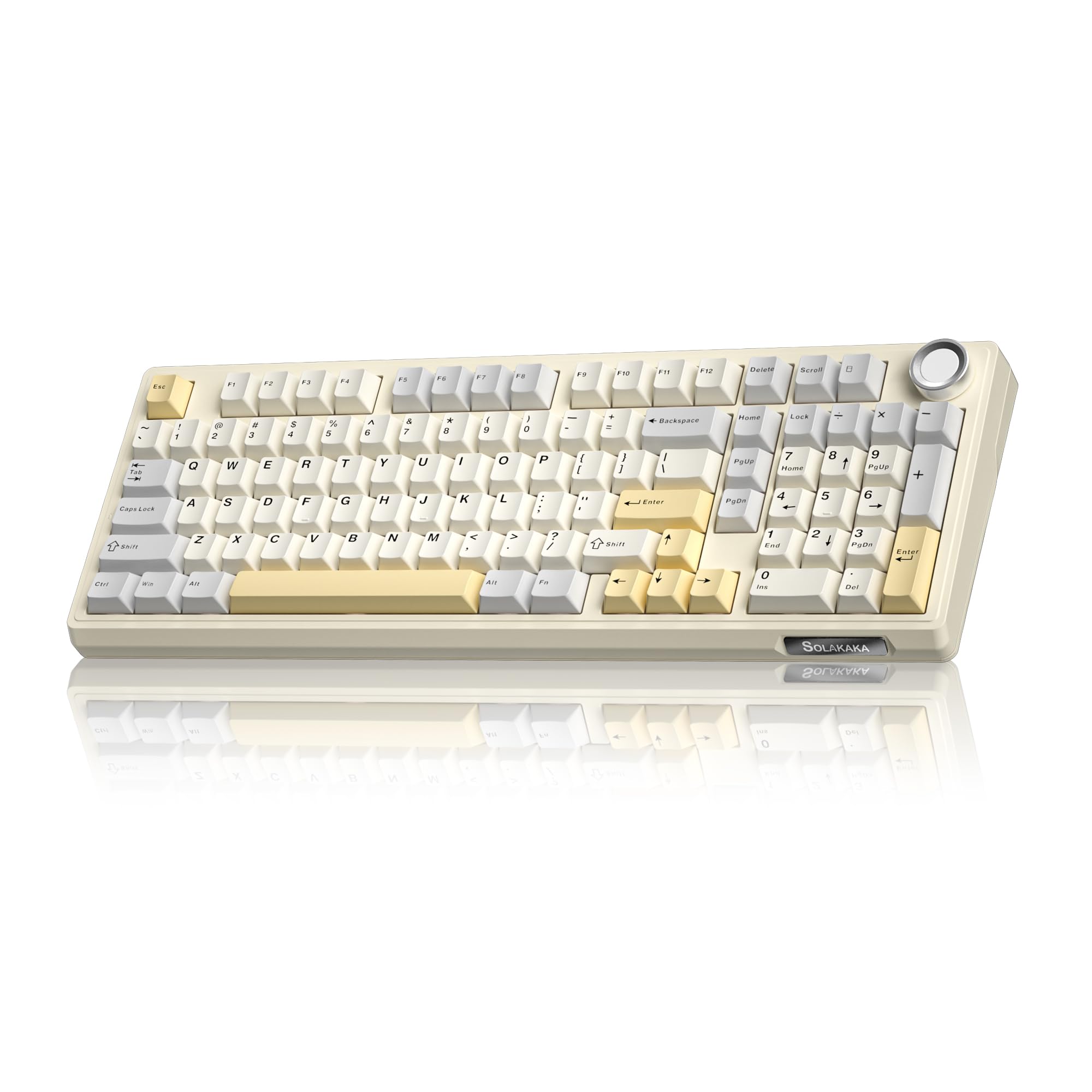
- 96% layout with number pad and multifunction knob
- Bluetooth, 2.4 GHz, and USB-C connections with a 10,000 mAh battery
- Hot-swappable switches and customizable RGB lighting
Best For: People who want a customizable wireless mechanical keyboard with a number pad and volume knob.
SOLAKAKA A99 Pro LCD
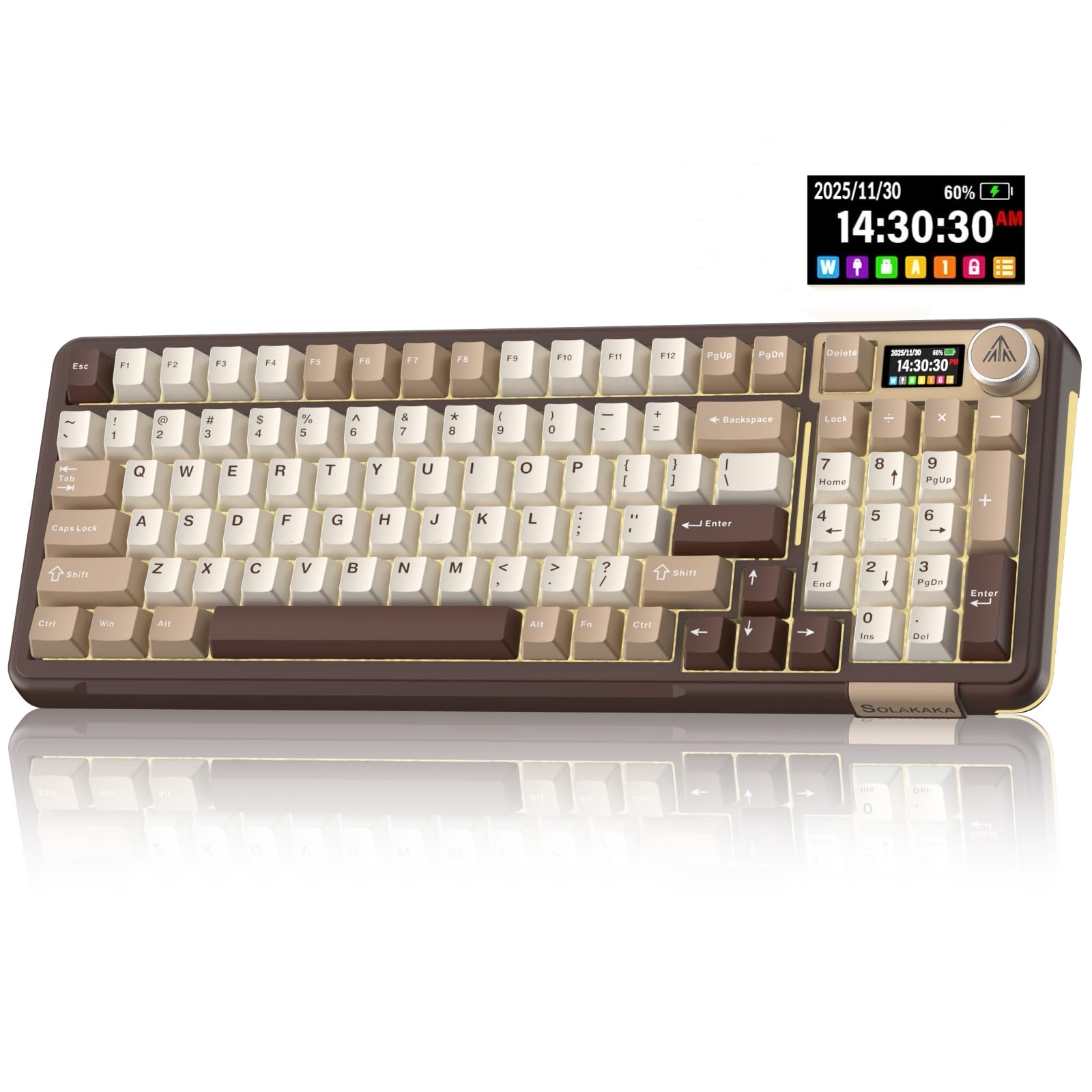
- LCD screen shows battery, connection, system, and time details
- Tri-mode connectivity and support for up to five devices
- Hot-swappable keys and a multifunction knob
Best For: Users who want a wireless mechanical keyboard that displays connection and battery details.
SOLAKAKA A99 Pro Wireless
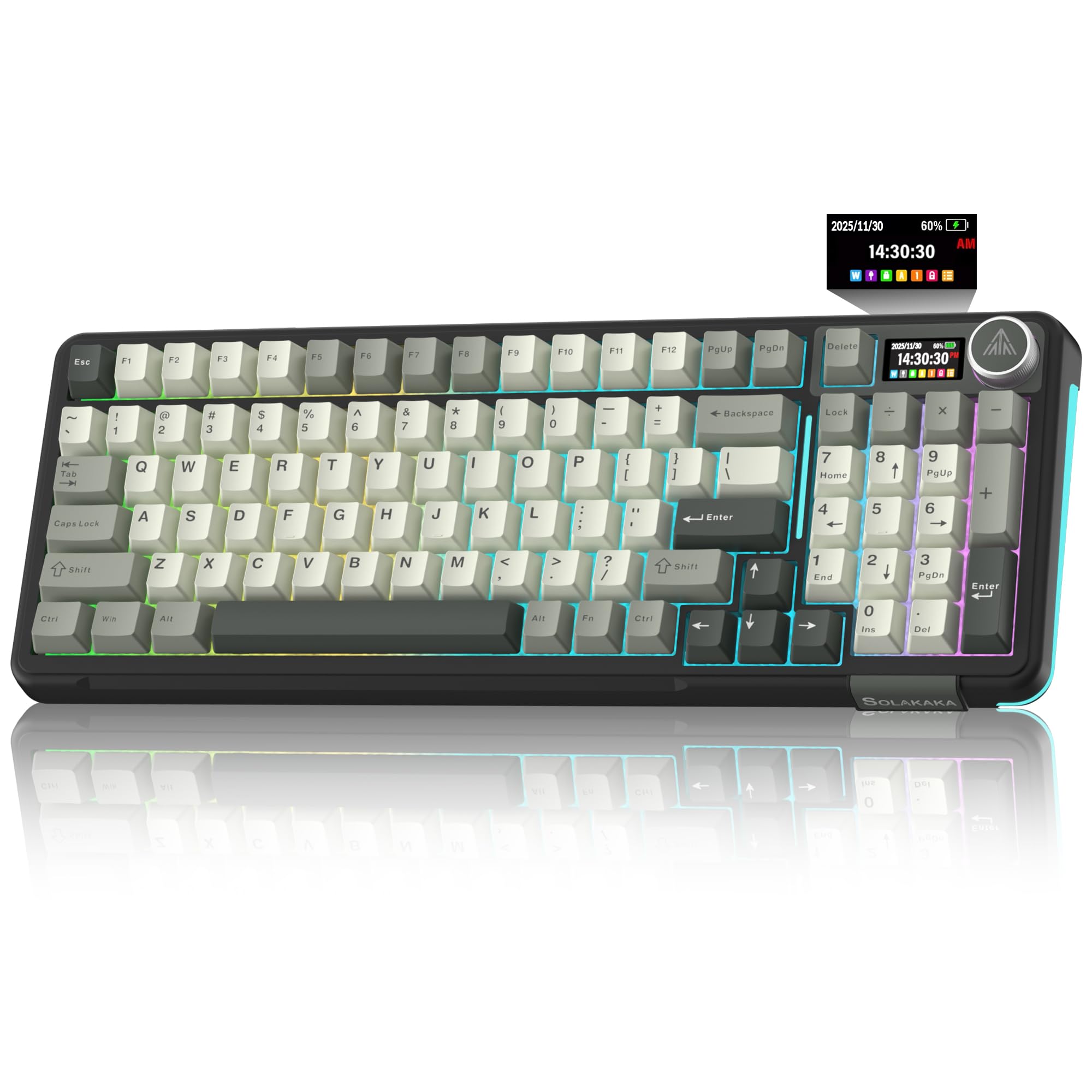
- 97-key 96% layout retains number pad and arrow keys
- LCD screen, multifunction knob, and support for up to five devices
- Bluetooth, 2.4 GHz, and USB-C connectivity
Best For: Workers seeking a number-pad keyboard with an LCD, multi-device connectivity, and hot-swap switches.
SOLAKAKA A99 Pro 96%
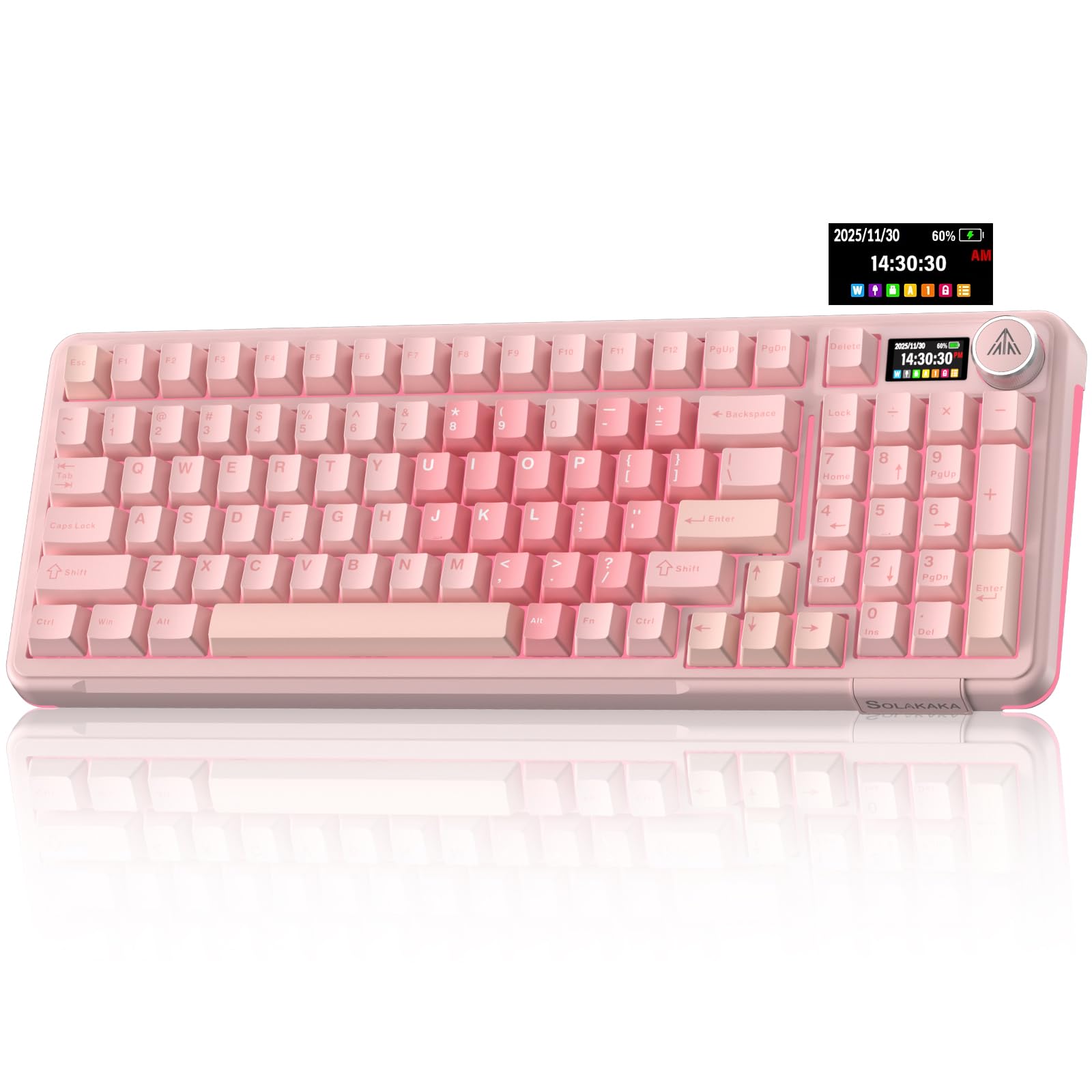
- 96% layout with number pad, arrows, and essential function keys
- LCD display and knob for status and controls
- Tri-mode connectivity with support for up to five devices
Best For: People who want an LCD-equipped mechanical keyboard with a number pad and programmable settings.
SOLAKAKA A75 Wireless
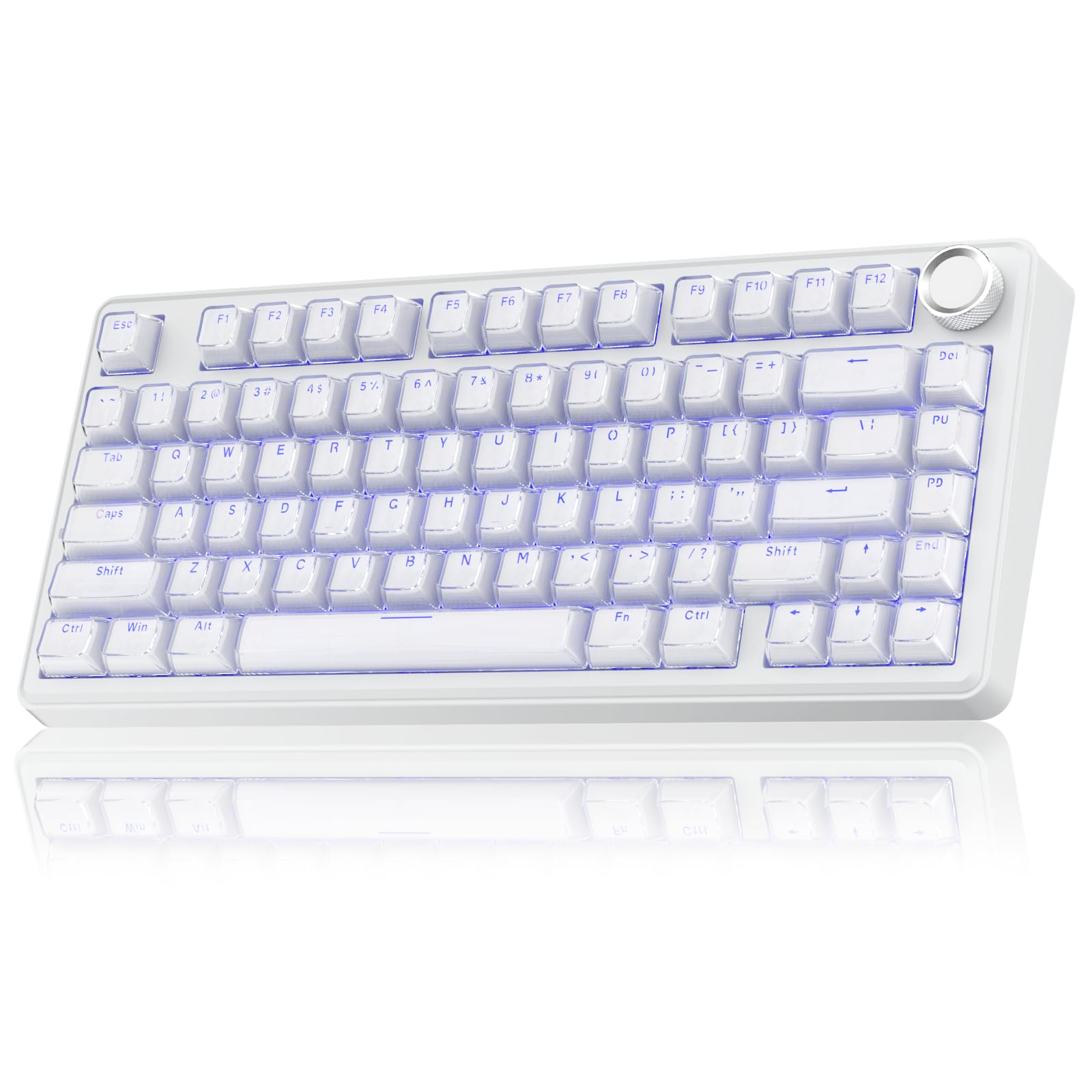
- 81-key 75% layout retains arrow keys in a compact footprint
- Bluetooth, 2.4 GHz, and USB-C connection options
- Hot-swappable switches, multifunction knob, and 4,000 mAh battery
Best For: Workers who prefer a compact mechanical keyboard with arrow keys and wireless multi-device support.
Full-Size Wireless Workflows
JLab, Epic, Wireless Keyboard, Bluetooth 5.2, USB Dongle, Multi-Device, Backlit, 108 Keys, Black
The JLab Epic pairs a full-size 108-key layout with wireless connectivity for desk work across several devices. Bluetooth 5.2 can pair with up to three devices, and a USB dongle offers another connection option.
Its backlit keys help with low-light typing, while the built-in media knob provides quick volume control. Soft-touch keys are designed for a comfortable, quiet typing feel, and the metal base adds stability to the desk setup.
A 2,000 mAh rechargeable battery powers the keyboard. The JLab Work App supports up to three custom profiles, which can help separate shortcuts or preferences by workflow.
Best For: People who want a full-size wireless keyboard with backlighting and easy device switching.
| Pros | Cons |
|---|---|
|
|
Choose the Epic if you want a conventional number pad and switch among several work devices without giving up backlighting. Its soft-touch keys and media knob suit writing, email, and routine media adjustments.
The JLab Work App adds profile customization, though buyers who prefer a keyboard that needs no companion software may not use that feature. Check that the USB dongle or Bluetooth pairing fits your computer setup, and consider whether the listed battery capacity meets your charging preferences.
Slim Layout With a Number Pad
JLab JBuds Wireless Keyboard, 95 Key, Multi-Device Bluetooth and USB dongle, Soft Touch Keys, Media knob, Custom Profiles, Black
The JLab JBuds uses a slim 95-key layout that keeps a full numerical pad while taking a compact approach to a work desk. Its soft-touch keys are intended for quiet typing, and a dedicated knob handles volume and playback control.
It connects over Bluetooth 5.2 or a USB wireless dongle, with toggling across up to three connections. The rechargeable battery is rated for up to 30 days of wireless use, though actual runtime depends on usage.
Through the JLab Work App, users can program shortcuts and save up to three profiles. Compatibility includes Windows, macOS, Android, and iOS.
Best For: Desk users who want a slim, quiet keyboard with a number pad and multi-device support.
| Pros | Cons |
|---|---|
|
|
Pick the JBuds if you want numeric-entry keys in a slim board and regularly move between a computer, tablet, or phone. Its stated battery estimate and quiet-feel keys make it suitable for a wireless office setup, while the knob keeps common media controls within reach.
It has fewer keys than a conventional 108-key full-size layout, so compare the key arrangement with your existing shortcuts before buying. Check whether the included dongle works with the ports available on your main device.
Compact, Quiet Typing With Spill Resistance
SteelSeries Apex 3 TKL RGB Gaming Keyboard – Tenkeyless Compact Form Factor - 8-Zone RGB Illumination – IP32 Water & Dust Resistant – Whisper Quiet Gaming Switch – Gaming Grade Anti-Ghosting,Black
The Apex 3 TKL removes the number pad for a tenkeyless layout that leaves more room for a mouse or paperwork. Its whisper-quiet switches and anti-ghosting feature are designed for accurate, low-noise keystrokes.
SteelSeries lists IP32 water and dust resistance, a useful consideration for a busy desk, but it should not be treated as waterproof. The keyboard has eight-zone RGB lighting and dedicated media controls, including a clickable volume roller.
It connects by USB and is compatible with Windows, Mac OS X, Xbox Series S and X, PS4, and PS5. This model suits workstations where quiet operation and desk space matter more than wireless connectivity.
Best For: People who want a quieter wired keyboard and more open desk space.
| Pros | Cons |
|---|---|
|
|
Consider the Apex 3 TKL for a shared office or compact desk where quiet keystrokes and a smaller footprint are priorities. Its media roller is convenient when switching between calls, music, and focused work, and the IP32 rating adds a limited level of resistance against dust and liquid exposure.
The tradeoff is the missing number pad, which may slow frequent spreadsheet or numeric entry. It is wired, so check that a USB connection suits your workstation and cable arrangement.
Quiet Full-Size Typing With Wrist Support
SteelSeries Apex 3 RGB Gaming Keyboard – 10-Zone RGB Illumination – IP32 Water Resistant – Premium Magnetic Wrist Rest (Whisper Quiet Gaming Switch)
The SteelSeries Apex 3 combines a full-size work layout with whisper-quiet switches and a magnetic wrist rest. Its 10-zone RGB illumination is customizable, while dedicated multimedia controls provide quick access to volume and other settings.
The keyboard has an IP32 water-resistance rating that helps address accidental splashes, though it does not mean the unit is waterproof. SteelSeries gives the switches a 20 million keypress rating.
Compatibility includes Windows, Mac OS X, Xbox Series S and X, PS4, and PS5. For work, its main appeal is the familiar full-size arrangement paired with quieter typing and integrated palm support.
Best For: Workers who want a quiet full-size keyboard with a wrist rest and dedicated media controls.
| Pros | Cons |
|---|---|
|
|
Choose this Apex 3 if you want to keep a number pad and prefer quiet keys with a wrist rest included. The dedicated controls are useful for common audio adjustments, and the IP32 rating is a practical detail for a busy desk.
Its full-size footprint can crowd a smaller workstation, so measure your available space if the mouse area is already tight. The connection type is not specified here; confirm that the particular offer matches your preferred setup.
Quiet Mechanical Typing With a Number Pad
SOLAKAKA KI99 Pro Wireless Mechanical Keyboard with Quiet Switch, Hot Swappable Pre-Lubed Switches with RGB Backlit, Gasket Structure Computer Gaming Keyboard (BlackBlue, Silent Switch)
The SOLAKAKA KI99 Pro Quiet combines a 96% layout with a number pad, a wireless connection option, and quiet switches. It supports Bluetooth 5.0, 2.4 GHz wireless, and USB-C wired connections, and its listed 10,000 mAh battery is designed to reduce charging frequency.
A gasket structure and five noise-reducing layers pair with silent switches for a quieter mechanical typing feel. The hot-swappable PCB supports 3-pin and 5-pin switches, so users can change the typing feel without soldering.
PBT keycaps, RGB lighting, and a control knob round out the feature set. Software supports key programming, lighting adjustments, and macros.
Best For: Mechanical-keyboard users seeking a quiet-switch wireless board with a number pad.
| Pros | Cons |
|---|---|
|
|
This model fits workers who want mechanical switches and a number pad but also value a quieter setup and wireless flexibility. The 96% layout keeps more keys close together than a standard full-size board, which can free some desk room while preserving numeric entry.
Its hot-swap support is useful if you want to change switches later. Check the key layout and whether the driver supports your operating system before relying on custom macros or key mappings.
Long-Battery 96% Mechanical Layout
SOLAKAKA KI99 Pro 96% Wireless Gaming Keyboard, RGB Creamy Keyboardw with Knob, Hot-Swappable Pre-Lubed Switches, Gasket Structure Mechanical Keyboards (Beige-White, Non-Silent Version)
The SOLAKAKA KI99 Pro offers a 96% layout that retains most full-size functions, including a number pad, in a more compact arrangement. It connects over Bluetooth 5.0, 2.4 GHz wireless, or USB-C and has a 10,000 mAh battery.
A multifunction knob handles volume, media, and lighting brightness. The gasket structure and five noise-reducing layers aim to soften key vibration, while pre-lubed switches and a hot-swappable 1.2 mm flex-cut PCB allow changes without soldering.
Its PBT keycaps are designed to resist wear and fading. RGB effects and macros can be customized with driver software.
Best For: People who want a customizable wireless mechanical keyboard with a number pad and volume knob.
| Pros | Cons |
|---|---|
|
|
Pick this KI99 Pro if you want a customizable mechanical board for mixed office work and personal use, especially when number entry and a volume knob matter. Tri-mode connectivity makes it adaptable to wired and wireless setups, while the compact full-function layout can save space compared with a conventional full-size keyboard.
Its mechanical design remains a matter of preference; consider how the included non-silent switch version fits your shared-workspace needs. Verify software compatibility if you plan to use custom macros.
Screen and Knob for Multi-Device Switching
SOLAKAKA A99 Pro Mechanical Keyboard with LCD Screen & Metal Knob, Wireless Gaming Keyboard with BT5.0/2.4GHz/USB-C, Hot Swappable Creamy Keyboard, Gasket Structure, RGB Backlit, for Win/Mac
The SOLAKAKA A99 Pro adds an LCD screen and metal knob to a 96% wireless mechanical keyboard. The screen displays information such as the date, time, battery level, connected system, and connection mode.
Bluetooth 5.0, 2.4 GHz wireless, and USB-C wired modes support up to five saved devices, while compatibility spans Windows, iOS, Mac, and Android. Its gasket structure uses five cushioning layers, and the hot-swap design supports 3-pin and 5-pin switches without soldering.
RGB lighting includes 16 modes, with additional side lighting. A web driver offers settings for key mapping, sensitivity, lighting, and macros.
Best For: Users who want a wireless mechanical keyboard that displays connection and battery details.
| Pros | Cons |
|---|---|
|
|
Choose this A99 Pro if you switch among several devices and value a screen that displays connection and battery information. The number pad remains available in the 96% layout, and the knob can handle system or lighting settings as well as volume.
It is a feature-rich choice for a configurable desk, though that complexity may be more than a basic typing workflow needs. Check which driver functions are available on your operating system before depending on customized mappings.
96% Layout With LCD and Five-Device Support
SOLAKAKA A99 Pro Wireless Mechanical Keyboard with LCD Screen & Metal Knob, 2.4GHz/BT5.0/USB-C, RGB Backlit Gaming Keyboard, Hot Swappable, Creamy Keyboard with Gasket Structure, for Win/Mac
This SOLAKAKA A99 Pro uses a 97-key, 96% layout that keeps the number pad, arrows, and essential function keys while conserving desk space. It connects through Bluetooth 5.0, 2.4 GHz wireless, or USB-C and supports up to five devices.
The LCD shows details including date, time, battery level, connected system, and connection mode; its multifunction knob handles volume, lighting, and system choices. Five cushioning layers form the gasket structure, and the switches are hot-swappable for 3-pin or 5-pin replacements.
RGB lighting includes 16 modes and side illumination. The web driver enables further customization such as key mapping and macros.
Best For: Workers seeking a number-pad keyboard with an LCD, multi-device connectivity, and hot-swap switches.
| Pros | Cons |
|---|---|
|
|
This A99 Pro suits a desk that needs number entry and frequent switching among computers or mobile devices. Its screen and knob provide access to connection details and common controls, while the 97-key arrangement saves space compared with a conventional full-size layout.
The gasket build and hot-swap support are useful if mechanical feel is a priority. Confirm that the device switching method and driver features meet your workflow, especially if you depend on custom shortcuts.
Customizable A99 Pro With 96% Layout
SOLAKAKA A99 Pro Wireless Gaming Keyboard with LCD Screen & Metal Knob, 96% Layout Mechanical Keyboard, 2.4GHz/BT5.0/USB-C, Hot Swappable, Creamy Keyboard with Gasket Structure, RGB, for Win/Mac
This A99 Pro variant pairs a 96% layout with an LCD screen, metal knob, and tri-mode connectivity. It supports Bluetooth 5.0, 2.4 GHz wireless, and USB-C wired connections, with capacity for up to five devices.
The LCD can display time, battery level, the connected system, and connection mode, while the knob controls functions such as volume and lighting. Its gasket structure combines five cushioning layers with a slotted PCB, and the switches are hot-swappable for 3-pin or 5-pin options.
RGB lighting offers 16 modes plus side lighting. A web driver supports key mappings, sensitivity, and macros.
Best For: People who want an LCD-equipped mechanical keyboard with a number pad and programmable settings.
| Pros | Cons |
|---|---|
|
|
Consider this model if you want a compact number-pad keyboard with visible device status and substantial mechanical customization. Its five-device capacity and three connection modes can suit a desk shared by multiple computers or mobile devices.
Since this A99 Pro shares many core features with other A99 Pro offers here, compare the exact model and price before choosing among them. Check that its 96% layout and software settings match your typing habits.
Compact 75% Wireless Mechanical Board
SOLAKAKA A75 Wireless Gaming Keyboard with Multifunction Knob, BT5.0/2.4GHz/USB-C, 75% Mechanical Keyboard, Hot-Swappable, Gasket Creamy Keyboard with RGB Backlit, Crystal Keycaps, for PC/Mac/PC
The SOLAKAKA A75 uses an 81-key, 75% layout that keeps arrow keys while removing many less-used keys to save desk space. It supports Bluetooth 5.0, 2.4 GHz wireless, and USB-C wired connections, with support for up to five devices.
Its gasket structure combines cushioning and sound-dampening layers, and the hot-swap design accepts 3-pin or 5-pin switches without soldering. A multifunction knob changes between gaming and office modes, where it can control lighting or volume.
The model includes crystal-style keycaps and a 4,000 mAh battery. The compact layout is best for users who rarely need a number pad.
Best For: Workers who prefer a compact mechanical keyboard with arrow keys and wireless multi-device support.
| Pros | Cons |
|---|---|
|
|
Choose the A75 if freeing desk space is more important than having a number pad, and you still want arrow keys and wireless device options. Its knob switches between work and gaming controls, and hot-swap support lets you change switches without soldering.
The 4,000 mAh battery capacity is specified, but no runtime estimate is provided. If your work involves frequent spreadsheets or numeric entry, compare the number-pad models above before settling on this smaller layout.
How to Choose Keyboards For Work
How We Picked Keyboards for Work
Work keyboards need to fit a real desk routine. We prioritized usable layouts, practical connection choices, and features that can make long typing sessions or shared spaces easier to manage.
The selection includes quiet boards for offices, full-size and near-full-size layouts for numeric entry, and compact models for desks where mouse room matters.
Several products here are marketed for gaming, but their work-relevant features include quieter switches, multi-device connections, programmable keys, or a number pad in a smaller footprint. Gaming-focused speed and lighting alone were not enough to make a candidate a useful work pick.
Comparing Keyboards for Work
Start with layout. The JLab Epic has 108 keys, and the SteelSeries Apex 3 keeps a full-size arrangement; the JLab JBuds uses 95 keys while retaining a number pad.
The SOLAKAKA KI99 and A99 models use a 96% layout with numeric entry, while the A75 trims down to 81 keys and keeps arrow keys. Compact designs reclaim desk space, but a missing or condensed key cluster can affect familiar shortcuts and spreadsheet work.
Typing sound and feel also matter. The Apex 3 models emphasize whisper-quiet switches, and the KI99 Quiet pairs silent switches with noise-reducing layers.
The JLab boards use soft-touch keys. The A99 and A75 are mechanical designs with hot-swap support, which can appeal to people who want to customize switch feel.
Mechanical switches are not automatically quiet, so consider the exact switch version and your workspace before buying.
For device flexibility, the SOLAKAKA models offer Bluetooth, 2.4 GHz, and USB-C modes. The JLab keyboards support Bluetooth and a USB dongle, while the SteelSeries Apex 3 products are USB-connected.
Multi-device capacity varies: several SOLAKAKA models support up to five devices, and the JLab options support up to three. Check that the stated connection method fits your computer and any peripherals you plan to share.
| Product | Standout features | Best for |
|---|---|---|
| JLab Epic Wireless KeyboardCheck Price |
| People who want a full-size wireless keyboard with backlighting and easy device switching. |
| JLab JBuds Wireless KeyboardCheck Price |
| Desk users who want a slim, quiet keyboard with a number pad and multi-device support. |
| SteelSeries Apex 3 TKLCheck Price |
| People who want a quieter wired keyboard and more open desk space. |
| SteelSeries Apex 3Check Price |
| Workers who want a quiet full-size keyboard with a wrist rest and dedicated media controls. |
| SOLAKAKA KI99 Pro QuietCheck Price |
| Mechanical-keyboard users seeking a quiet-switch wireless board with a number pad. |
| SOLAKAKA KI99 ProCheck Price |
| People who want a customizable wireless mechanical keyboard with a number pad and volume knob. |
| SOLAKAKA A99 Pro LCDCheck Price |
| Users who want a wireless mechanical keyboard that displays connection and battery details. |
| SOLAKAKA A99 Pro WirelessCheck Price |
| Workers seeking a number-pad keyboard with an LCD, multi-device connectivity, and hot-swap switches. |
| SOLAKAKA A99 Pro 96%Check Price |
| People who want an LCD-equipped mechanical keyboard with a number pad and programmable settings. |
| SOLAKAKA A75 WirelessCheck Price |
| Workers who prefer a compact mechanical keyboard with arrow keys and wireless multi-device support. |
Choosing an Office Keyboard for Your Desk
A number pad is valuable for bookkeeping, spreadsheets, and data entry. If you need those keys but want to reduce the board's footprint, a 96% keyboard offers a middle ground.
The 75% A75 is more compact but drops the number pad, so it suits writing and general navigation better than frequent numeric entry.
Think about controls and software as part of the setup. Knobs on the SOLAKAKA boards handle volume and lighting, and the A99 screen also displays connection and battery details.
JLab's media knobs provide volume or playback control; its app supports profiles and shortcuts. Software features are useful when you will configure them, but confirm compatibility and whether you need a wired connection for setup.
Who Should Buy Which Keyboard for Work?
For a quiet shared office, consider the SteelSeries Apex 3 TKL if you want to save desk space, or the full-size Apex 3 if you want a number pad and wrist rest. For a soft-touch wireless board, the JLab Epic gives you full-size keys and backlighting; the JBuds keeps a number pad in a slimmer 95-key design.
For customized mechanical typing with numeric keys, compare the quiet KI99 Pro with the screen-equipped A99 Pro models. Choose among the A99 offers by checking the exact version and current offer details, since their core features overlap.
If desk space takes priority and you can work without a number pad, the A75 provides a compact layout with arrow keys and three connection modes. Before ordering, confirm the layout, switch type, connection mode, and operating-system support against your work devices.